

Kitchen Mats
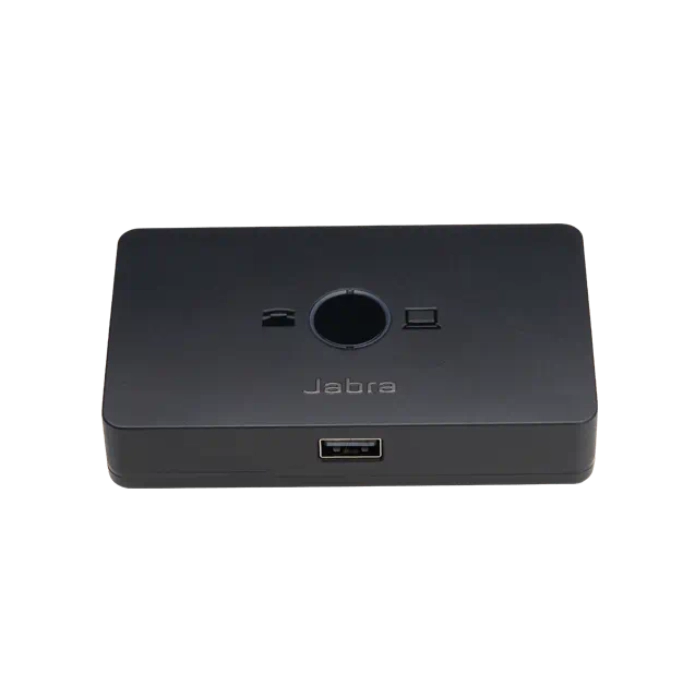
Jabra Link 950 Adapter
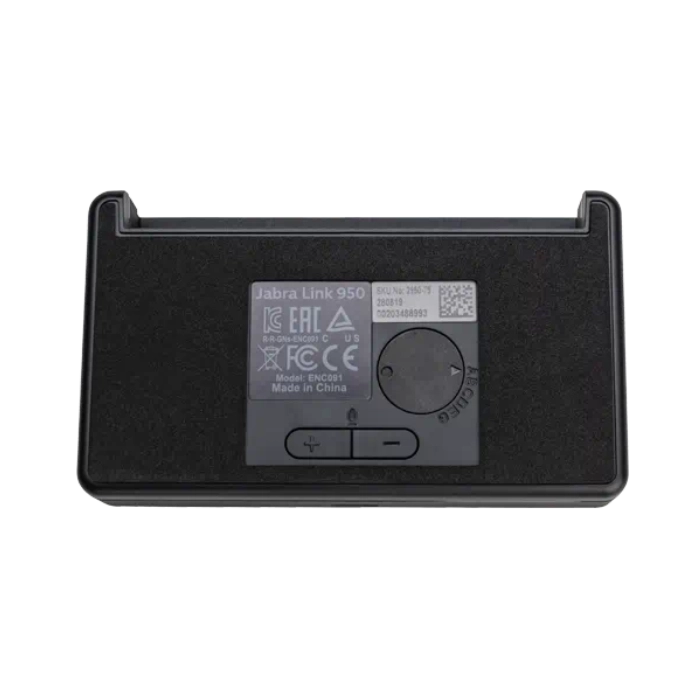
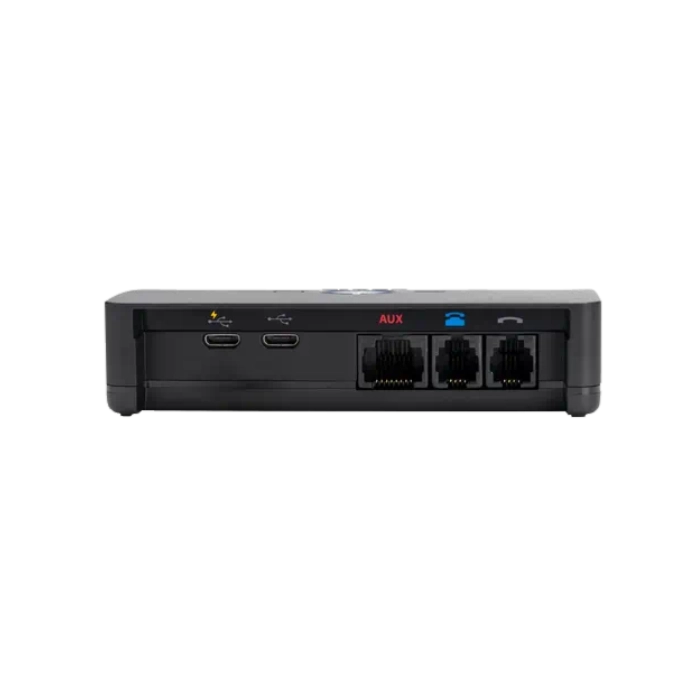
Boost Your Headset Productivity The Jabra Link 950 Adapter helps boost productivity by enabling you to use a USB headset, either with just the desk phone or with a desk phone and softphone. Choose from our wide range of corded and wireless USB headsets and look for Bluetooth® functionality if you also want the headset to connect to a mobile phone. Link 950 Adapter Is Ready for the Future The ability to connect to your desk phone, softphone and mobile phone* gives valuable flexibility for organizations transitioning to softphones or operating in mixed phone environments. *Mobile phone connectivity is limited to headsets with Bluetooth functionality. Easy To Install, Use and Manage The Jabra Link 950 adapter is simple to set up and has a small, unobtrusive footprint on the desktop. Easy call management enables you to seamlessly switch between phone devices at the touch of a button. Central management of USB headsets is easy using Jabra Xpress. Works With A Wide Range of USB Headsets The Jabra Link 950 adapter is available in both USB-A and USB-C versions that work with a wide range of USB headsets**. Pick the right headset for your needs, choosing from features such as Active Noise Cancellation, busylight and microphone positioning guidance – to boost your productivity and combat noise and interruptions in the open office. **Check whether your headset is compatible here: jabra.com/help/link-950/compatibility. Product Overview – LINK 950 Connect to your deskphone Use the ports on the back to connect to your deskphone Connect your computer You can choose your preferred computer softphone client as default in Jabra Direct LED indication LED indicates which phone is connected A/C power supply Required for use with: Jabra Evolve 40, 80, Jabra GN1000, and Jabra devices when using the Link 360 Bluetooth adapter Connect your headset Jabra Link 950 comes is USB-A and USB-C versions so you can choose the USB headset that best serves your needs Compatible with Your Platform All Jabra USB headsets and speakerphones work with all the most popular online voice call services. Our products work out of the box* and let you combine perfect sound quality with great comfort. Do you need to connect to your deskphone? Check our compatibility guide. *Jabra is certified with all major communication platforms but as a minimum, all Jabra USB devices will work as audio only. Jabra Link 950 Technical Specifications Audio Digital Signal Processing (DSP) Line Filtering Audio Streaming Volume synchronization Desk phone and softphone switch AC power supply (available as an accessory)* Required for use with Jabra Evolve 40, Jabra Evolve 80 and GN 1000, Jabra Bluetooth headsets in wired USB audio mode and Jabra devices when using the Jabra Link 360 Bluetooth adaptor. Connectivity Phone compatibility: Desk phone & Softphone Phone connection ports: Micro USB for computer softphone RJ-9 for handset RJ-9 for desk phone audio RJ-45 for AUX Power connection Micro USB for accessory power supply General Main unit dimension: 105 x 60.6 x 23.6mm/4.14 x 2.39 x 0.93 inch Weight: 190.8g/0.42 Pound Cord length (micro-USB cable to connect to USB host): 1500mm/59 inch Charging plug dimensions (D x W x H): 95 x 110 x40mm/3.74 x 4.33 x 1.57 inch Operating temperature: 0 °C to 40 °C / 32 °F to 104 °F Storage temperature: -20 °C to 50 °C / -4 °F to 122 °F Warranty: 2 years Variants USB-A: SKU: 1950-79 UPC: 706487019374 Jabra Model Number: ENC090 USB-C: SKU: 2950-79 UPC: 706487019381 Jabra Model Number: ENC091 Optional Power Supply: 14207-48 | UPC: 706487019558 What’s in the box Jabra Link 950 in USB-A or USB-C variant Desk phone RJ9 cable USB-A computer softphone cable USB-C computer softphone cable Quick start guide FAQ’s How do I adjust the microphone volume of the desk phone? To adjust the microphone volume of the desk phone, use the Microphone volume buttons ( / -) on the bottom of the Jabra Link 950. Bottom Note: Setting the microphone volume too high may cause an echo How do I get a dial tone for the desk phone? If you are connected to a desk phone, but you do not hear a dial tone in the connected headset, rotate the Dial tone switch on the bottom of the Jabra Link 950 until you hear a dial tone. How can I reduce the echo in my headset? Make sure you have configured your headset to get the best possible audio with your desk phone, and positioned your microphone close to your mouth. The volume on your desk phone should be set halfway, and it should approximately match the volume level of the microphone on your Jabra headset. If you are still hearing an echo, the microphone volume on the headset may be set too high. Refer to the Quick Start Guide or User Manual for your Jabra device for specific instructions on how to adjust these settings. Try to decrease the microphone volume, one step at a time, while you talk. As the volume of the microphone decreases, the echo will also decrease or be eliminated. If you are hearing your own voice in your headset at the same time as you are speaking, this is not a delayed echo – it is a feature called sidetone. Depending on the equipment being used, you may be able to adjust the sidetone level on your phone, headset, or computer. How do I ensure an audio connection from my desk phone when using my Jabra headset with the Jabra Link 950? Prerequisites Jabra Link 950 with one of the following headsets: Jabra Engage 50 (not using the Jabra Engage 50 Link Controller) Jabra Biz 1500 USB Jabra QD headset and the Jabra Link 230 Jabra Direct – latest version If you are connecting your Jabra headset to a desk phone using the Jabra Link 950, you may need to adjust the Jabra Link 950 settings using Jabra Direct. To adjust the settings, follow these steps. Go to Jabra Direct > Device > Jabra Link 950 > Settings > Desk phone. In Automatic detection of hook lifter type, click the slider to turn it off. In Electronic hook lifter, select MSH. This will enable the Jabra Link 950 to detect the audio stream from the desk phone and pass it to the headset. Depending on your phone settings, you may also need to press the Headset button on your desk phone. Note Images and text are for guidance purposes only. Actual images and text may vary depending on the connected device and updates to the software.
Related products
-
Cleo Rug in 013-0025-4373 by Mastercraft Rugs Pet Accessories & Apparel
-
Cleo Rug in 013-0030-6191 by Mastercraft Rugs Pet Accessories & Apparel
-
Cleo Rug in 013-0036-5171 by Mastercraft Rugs Pet Accessories & Apparel